|
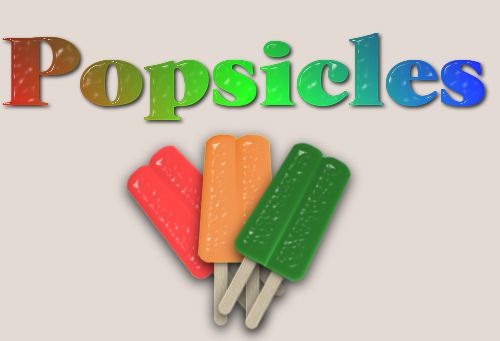
Okay, something about food lately. Maybe I'm one of those people that would rather draw food than eat it, lol.
Anyway, I figured out how to make a popsicle. So let's bring a little bit of summer in and make one.
For this tutorial you will need:
PSP7
EyeCandy 4000
Popsicle stuff
Put the popsicle.sel into your selections folder (you may have to make one). Put the popsiclestick.pbv into your presets folder. Put the popsicle (preset for EyeCandy 4000) into Eye Candy 4000 settings/Glass folder. Put the wood1.jpg anywhere you can find it.
- Open up a new image, 400x400, 16million colors, transparent background.
- Open up the Wood1.jpg in your psp.
- With your selection tool set to rounded rectangle, antialias checked, make a long, thin rectangle on your image. Flood fill it with the wood.
- Now go to Effects>3D Effects>Inner Bevel and use the popsiclestick preset.
- Deselect and minimize.
- Open another new image, same as before.
- Go to Selections>Load from disk and load the popsicle.sel.
- Flood fill with a good popsicle color, I used #FF4040, but anything will do. Deselect.
- Using your selection tool set to rectangle, antialias unchecked, make a rectangle so that it only surrounds one side of your popsicle. Click inside the popsicle to select just that half.
- Now go to Effects>Plug Ins>Eye Candy 4000>Glass and use the popsicle preset. If your popsicle is the same color as mine, then you are done. If it is a different color, you will need to change the color of the glass to match your color. Click okay. Deselect.
- Using the selection tool, same settings, select around the other side of the popsicle but have it overlap the first half just a bit at the center.
- Apply your glass again. Deselect.
- Now open up your stick again and copy it. Go to your popsicle image and paste as new layer twice.
- Line up your sticks like within each side of the popsicle. Hide your popsicle layer and merge the stick layers.
- Move your sticks layer below your popsicle layer.
- With your sticks layer active, make a new layer.
- Make your popsicle layer active and using the magic wand click anywhere outside the image. Invert the selection and contract it by 3.
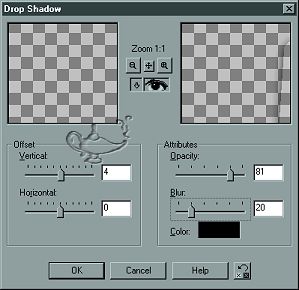
- Now go to the layer in between your popsicle layer and your sticks layer and go to Effects>3D Effects>Drop Shadow and set it like below then deselect.
- Now go to your sticks layer and using the magic wand, click anywhere outside the sticks.
- Go back to the shadow layer and hit your delete key. Deselect.
- Save this as it is with all the layers. It will be easier to make different colors (flavors).
- Go to Window>duplicate to make a duplicate of your popsicle. Close the original.
- Merge visible all the layers. Add a new layer and move it to the bottom.
- Flood fill it with your page background or color.
- Your Done!!!!! Happy Drooling!!!!!
Tutorial Index
Website design ©Bluegenie2 Designs
|
|

